Mobile Hacking Labs - Strings
Check out my MHL Series which brings writeups of the Mobile Hacking Lab Android challenges, that are part of the CAPT course. The labs are well created and are good for preparation of the CAPT exam.
- - these writeups assume knowledge in basic android hacking methodolgy and familiarity with tools including adb, jadx(gui), Frida, etc
Challenge Overview

The Strings challenge gives a clear idea of how Intents and Intent filters work in Android and a hands-on experience using Frida APIs. The aim of the challenge is to get a flag with the format “MHL{…}”
Access the MHL Strings Challenge
Discovery and Recon
While we have a clue of what the challenge is – unsecured intents and components, the specifics of the vulnerability and later exploitation will be more apparent with a deeper analysis.
From the challenge instructions we have a clue of what to look out for:
- Android Intents & Filters
- Frida APIs & Memory Scanning
- Shared Preferences
- Android Native Libaries
Running the application
I run the application to see accesible activities and any other hints and features.
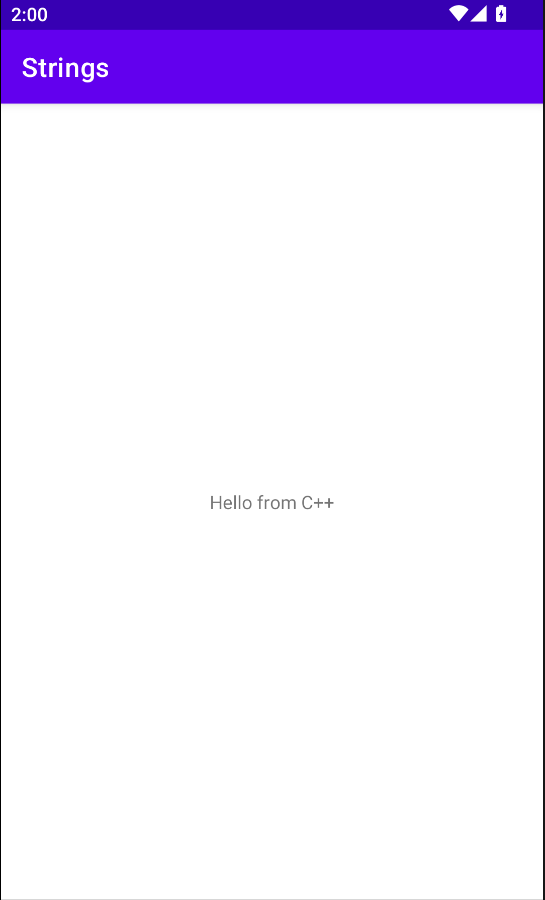
note: MainActivity displays Hello from C++ and nothing more.
Reverse Engineering & Code Analysis
I found a tool to speed up static analysis of the AndroidManifest.xml file called Deeper. However, I manually decompile the app using jadx-gui as I primarily use it for extensive code analyis. You could use deeper and other tools for automation in case of multiple or large applications.
An analysis of the manifest reveals an activity com.mobilehackinglab.challenge.Activity2 with the following attributes:
1    <android:exported="true">
2    <intent-filter>
3    <action android:name="android.intent.action.VIEW"/>
4    <category android:name="android.intent.category.DEFAULT"/>
5    <category android:name="android.intent.category.BROWSABLE"/>
6    <data
7        android:scheme="mhl"
8        android:host="labs"/>
9    </intent-filter>
note:
exportedactivities/components can be accessed by other applications and critical components should be protected by having the attribute asfalse- the activity handles a custom uri
mhl://labs.
With that info, I start going through the Activity2 code satring with it’s onCreate() method.
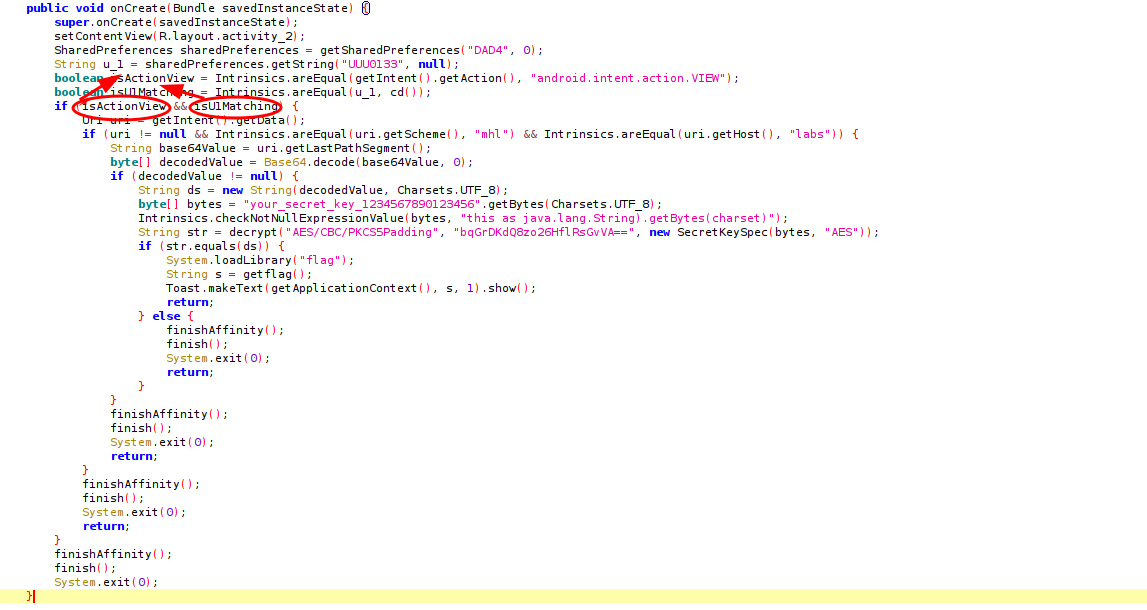
In mind, is the goal of the lab –get the flag dumped into the memory. However there are four conditions to be met, before finally having the app call the getflag() method.

Getting the conditions true for all the if statements will get the getflag() method called. So let’s do that:
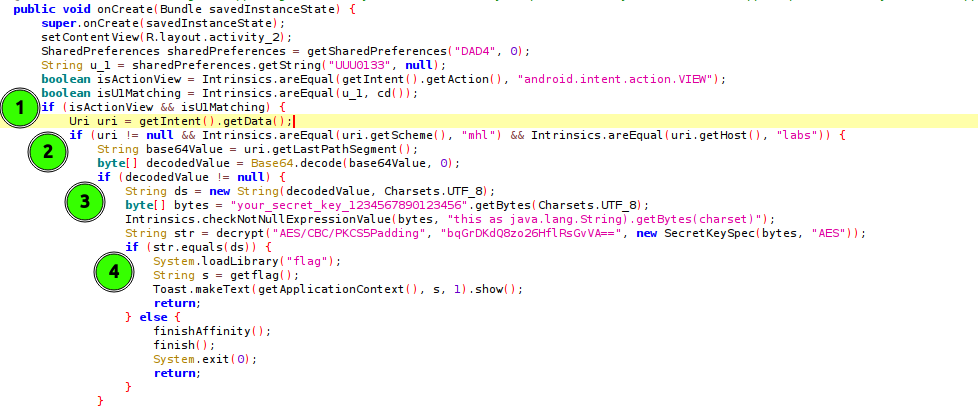
Statement 1: Has two conditions
If both conditions are true, the intent data is retrieved.
boolean isActionView = Intrinsics.areEqual(getIntent().getAction(), "android.intent.action.VIEW");
Checks that the action of the calling intent is "android.intent.action.VIEW". This is important to note, as it will be used in crafting the final adb command.
boolean isU1Matching = Intrinsics.areEqual(u_1, cd());
Checks if two strings (u_1 and string returned by cd()) are equal. And what are this two strings?
String u_1 = sharedPreferences.getString("UUU0133", null); -> u_1 gets the value of a sharedPreference record with the key “UUU0133”.
method cd()
 1    private final String cd() {
 2        String str;
 3        SimpleDateFormat sdf = new SimpleDateFormat("dd/MM/yyyy", Locale.getDefault());
 4        String format = sdf.format(new Date());
 5        Intrinsics.checkNotNullExpressionValue(format, "format(...)");
 6        Activity2Kt.cu_d = format;
 7        str = Activity2Kt.cu_d;
 8        if (str != null) {
 9            return str;
10        }
11        Intrinsics.throwUninitializedPropertyAccessException("cu_d");
12        return null;
13    }
Returns the date with the Format specified. This means that the string u_1 also has to be a date with the same format for the two to be equal.
Statement 2
1    if (uri != null && Intrinsics.areEqual(uri.getScheme(), "mhl") && Intrinsics.areEqual(uri.getHost(), "labs")) {
2        String base64Value = uri.getLastPathSegment();
3        byte[] decodedValue = Base64.decode(base64Value, 0);
This checks if the scheme and host match “mhl” & “labs” respectively. If they do, it passes the segment/path (base64) of the uri and decodes the value to bytes.
Statement 3
1if (decodedValue != null) {
2     String ds = new String(decodedValue, Charsets.UTF_8);
3     byte[] bytes = "your_secret_key_1234567890123456".getBytes(Charsets.UTF_8);
4     Intrinsics.checkNotNullExpressionValue(bytes, "this as java.lang.String).getBytes(charset)");
5     String str = decrypt("AES/CBC/PKCS5Padding", "bqGrDKdQ8zo26HflRsGvVA==", new SecretKeySpec(bytes, "AES"));
If the decoded value is not null, the method decrypt() is called and returns a string str.
Okay, we’re getting somewhere. We have to understand the decrypt() method and find a way to decypt the encoded string.
Statement 4
1if (str.equals(ds)) {
2    System.loadLibrary("flag");
3    String s = getflag();
4    Toast.makeText(getApplicationContext(), s, 1).show();
5    return;
Checks of the decrypted string str (from statement 3) matches the decode string(last segment/path) from the uri data. If true, the native library flag is loaded and the native method getflag() called.
With all the conditions known, two things remain. Ensuring the sharedPrefences “DAD4” with key ““UUU0133” has the date with the specified format and decrypting the encoded string to get the last segment of the uri.
Exploitation
After the recon and discovery of possible entry points we have a way to exploit this.
- Get the dates returned by the sharedPreference and
cd()method to match. - Decrypt the encoded string to get the last segment.
- Use
adbto start the exported activity. - Dump the memory of the app and look for string.
In the mainactivity we see a declaration of KLOW method that creates a SharePreference “DAD4”, gets the date in specified format and puts that in the sharedPrefence with key “UUU0133”. Well, we have to use Frida to reach and call this method.
 1public final void KLOW() {
 2    SharedPreferences sharedPreferences = getSharedPreferences("DAD4", 0);
 3    SharedPreferences.Editor editor = sharedPreferences.edit();
 4    Intrinsics.checkNotNullExpressionValue(editor, "edit(...)");
 5    SimpleDateFormat sdf = new SimpleDateFormat("dd/MM/yyyy", Locale.getDefault());
 6    String cu_d = sdf.format(new Date());
 7        editor.putString("UUU0133", cu_d);
 8        editor.apply();
 9    }
10}
Jadx-gui has a very helpful feature to get Frida snippets. I used that and got the following to add to a klowing.js file.
1Java.perform(function () {
2    let MainActivity = Java.use("com.mobilehackinglab.challenge.MainActivity");
3        MainActivity["KLOW"].implementation = function () {
4        console.log(`MainActivity.KLOW is called`);
5        this["KLOW"]();
6};
7});
With this script, frida hooks the MainActivity and calls the KLOW method.
frida -U -f com.mobilehackinglab.challenge -l klowing.js
And now if you check the shared prefs, we have the sharedPref with the date added.

Now, to decrypting the encoded text.
The decrypt method has three parameters. The alogrithm, cipherText and key. Since we have all three, we can rewrite/have gpt rewrite for us the method in a way we can run locally to get decrypted string.
I used this script:
 1import javax.crypto.Cipher;
 2import javax.crypto.spec.IvParameterSpec;
 3import javax.crypto.spec.SecretKeySpec;
 4import java.nio.charset.StandardCharsets;
 5import java.util.Base64;
 6
 7public class DecryptExample {
 8
 9    // This is the IV used during encryption and decryption
10    public static final String fixedIV = "1234567890123456";
11
12    public static void main(String[] args) {
13        try {
14            // Define the key as byte array
15            byte[] keyBytes = "your_secret_key_1234567890123456".getBytes(StandardCharsets.UTF_8);
16            SecretKeySpec key = new SecretKeySpec(keyBytes, "AES");
17
18            // Encrypted text
19            String cipherText = "bqGrDKdQ8zo26HflRsGvVA==";
20
21            // Call the decrypt method
22            String decryptedText = decrypt("AES/CBC/PKCS5Padding", cipherText, key);
23
24            // Print the decrypted text
25            System.out.println("Decrypted Text: " + decryptedText);
26        } catch (Exception e) {
27            e.printStackTrace();
28        }
29    }
30
31    public static String decrypt(String algorithm, String cipherText, SecretKeySpec key) {
32        try {
33            // Retrieve the IV
34            byte[] ivBytes = fixedIV.getBytes(StandardCharsets.UTF_8);
35
36            // Create Cipher instance
37            Cipher cipher = Cipher.getInstance(algorithm);
38
39            // Initialize the cipher with the key and IV
40            IvParameterSpec ivSpec = new IvParameterSpec(ivBytes);
41            cipher.init(Cipher.DECRYPT_MODE, key, ivSpec);
42
43            // Decode the Base64 encoded ciphertext
44            byte[] decodedCipherText = Base64.getDecoder().decode(cipherText);
45
46            // Decrypt the ciphertext
47            byte[] decryptedBytes = cipher.doFinal(decodedCipherText);
48
49            // Convert decrypted bytes to String
50            return new String(decryptedBytes, StandardCharsets.UTF_8);
51        } catch (Exception e) {
52            throw new RuntimeException("Decryption failed", e);
53        }
54    }
55}

Now that we have the last uri segment, and the date in the sharedpref, we can send the intent and see what happens.
Command:
1adb shell am start -W -a android.intent.action.VIEW -d "mhl://labs/bWhsX3NlY3JldF8xMzM3" -n com.mobilehackinglab.challenge/.Activity2
Results:
1Starting: Intent { act=android.intent.action.VIEW dat=mhl://labs/... cmp=com.mobilehackinglab.challenge/.Activity2 }
2Status: ok
3LaunchState: WARM
4Activity: com.mobilehackinglab.challenge/.Activity2
5WaitTime: 93
6Complete
With that we can dump and examine the app memory. I use Fridump for this.
